Saturday, 30 November 2019

Tesla Cybertruck Will Join Dubai Police Force in 2020 https://beebom.com/wp-content/uploads/2019/11/dubai-police-cybertruck.jpg

The Dubai police department has officially announced that it will add Tesla Cybertrucks to its fleet. Earlier this week, the official Twitter account of Dubai Police posted an image of a Dubai Police themed Tesla Cybertruck with the caption “2020”.

Commander-in-Chief of Dubai Police Major General Abdullah Khalifa Al Marri says that Cybertruck will mainly be used to enhance security presence in tourist destinations like Burj Khalifa, Sheikh Mohammed Bin Rashid Boulevard, Jumeirah Beach Residence, and La Mer, according to a report from Arabian Business.

In case you are unaware, The Dubai Police department has some of the best luxury sports cars including the Bugatti Veyron and Lamborghini Aventador. Seeing an electric pickup truck amongst this lineup is indeed incredible, isn’t it?

Don’t get me wrong, the Cybertruck isn’t inferior in the lineup by any means. It can do an impressive 0-60 in 2.9 seconds, and a quarter-mile in 10.8 seconds. What makes Cybertruck an apt police cruiser is its “bulletproof” nature as the company claims that it can withstand 9mm handgun bullets.

Elon Musk has confirmed that the electric pickup truck has already received 250,000 pre-orders. This deal will be certainly beneficial for Tesla from a business point of view and it will boost the sales of the Cybertruck.

However, it remains unclear how the 2020 timeline will be fulfilled by the electric car maker as the Cybertruck was announced to begin production by late 2021 for the single and dual-motor versions and late 2022 for the tri-motor truck variant.

So, what are your thoughts on the Tesla Cybertruck? Now that it has been over a week since its unveil, you must have picked a side regarding its design aesthetics. I personally like the design of Cybertruck. Which side are you on? Let us know in the comments.

from Beebom https://beebom.com/tesla-cybertruck-will-join-dubai-police-force-2020/

Bliss OS 12 Brings Android 10 to Your PC https://beebom.com/wp-content/uploads/2019/11/bliss-os-12.jpg

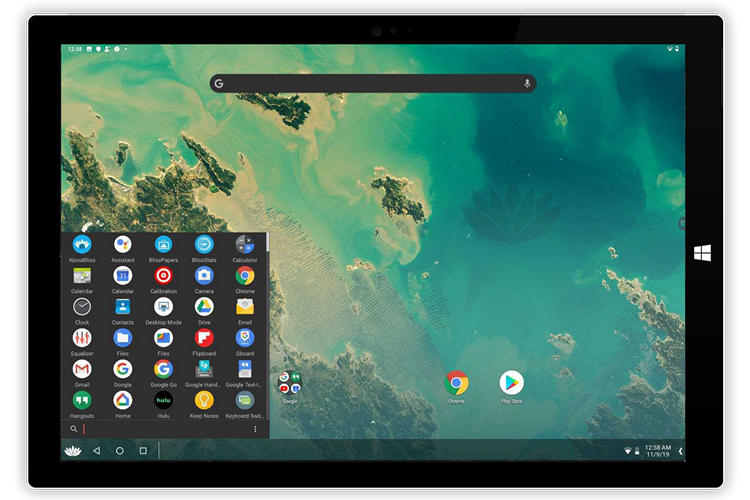
Bliss team has started testing Bliss OS 12 based on Android 10 for PCs. For the uninitiated, Bliss OS is an open-source operating system based on the Android-x86 project that comes with a lot of customization and security features.

“We have started our first round of testing for Bliss OS 12, based on Android 10.”, says the developers on their website.

Bliss OS developers recommend installing this alpha build on a pre-existing NTFS partition or Windows partition. They also suggest you to avoid formatting from their USB installer.

It is worth noting that this build is meant only for testing purposes. We would recommend you to wait until the stable version of Bliss OS 12 comes out instead of switching to this operating system as the daily driver on your primary machine as of now.

As I mentioned above, the current version will have bugs since it is meant for testing. The known issues include sleep issues on non-Vulkan machines, device crash on the lock screen, inability to install Magisk, and low volume.

If you’re interested to check out Bliss OS 12 alpha right now, you may do so by entering the secret code here to get the download link. The instructions to get the secret code are provided in their XDA forum thread here.

The secret code is quite simple but if you are not able to find it, don’t worry. We have got you covered. Check the direct link given at the bottom of the article. If you’re feeling adventurous, you can build Bliss OS from the source by following the instructions given here.

Finally, if you just want to use some apps or play Android games on your PC, you are better off with Android emulators as they are both easier to install and use.

Download Bliss OS 12 Alpha

from Beebom https://beebom.com/bliss-os-12-brings-android-10-pc/

Gamer Sued His Friend for Selling 10-Crore Worth Character at Rs.40,000 https://beebom.com/wp-content/uploads/2019/11/angry-gamer.jpg

Gone are the days when people approach the court for solving real-world legal disputes. In this modern age, a Chinese gamer has reportedly sued his friend and NetEase for selling his video game character worth Rs 10 crores for a throwaway price of less than Rs 40,000.

According to the report, Lu Mou, the gamer who filed the complaint spent almost 10 million Yuan (~Rs. 10 crores) for customizing his character in the game “Justice Online”. He shared his ID with his friend Li Mouscheng so that he could also enjoy the game in Mou’s cool outfit.

Mouscheng, however, betrayed Mou and sold the character on the in-game marketplace NetEase for 3,888 Yuan (~Rs. 40,000). Mouscheng was in fact trying to sell the character for 388,000 Yuan but he committed a typographical error as he was feeling “dizzy from excessive gaming”.

A Chinese court at Sichuan Province heard the case and released the judgment in favor of Mou. The court ordered to return the game character to the original owner and asked the plaintiff to provide a compensation of 90,000 Yuan (~Rs. 9 Lakhs) for the inconvenience caused to the gamer who bought the character at cheap price. The court also warned people about the aftereffects of indulging too much in video games.

I would say Li Mouscheng broke the unwritten rule of the gamer code. One shouldn’t simply betray the trust of a fellow gamer as Lu Mou was generous enough to share his costly character with him. I don’t think he is going to share his credentials ever again after this incident.

So, what are your thoughts on this? Do you share your paid characters and avatars with your friends so that they could also experience the same without shelling out money? Let us know in the comments.

from Beebom https://beebom.com/gamer-sued-friend-for-selling-10-crore-worth-character-40000/

87% of Children Exceed Recommended Screen Time for Their Age : Study https://beebom.com/wp-content/uploads/2019/11/87-of-Children-Exceed-the-Recommended-Screen-Time-for-Their-Age.jpg

A recent study published in the journal JAMA Pediatrics reveals that the daily screen time of children increased from 53 minutes when they’re 1 year old to more than 150 minutes when they reach 3 years of age.

As per their findings, almost 87% of children exceed the American Academy of Pediatrics’ recommended screen time for their age. The American Academy of Pediatrics recommends completely avoiding digital media for children under 18 months of age and slowly introducing children to screens when they’re 18 to 24 months old.

“Our results indicate that screen habits begin early, this finding suggests that interventions to reduce screen time could have a better chance of success if introduced early,” says Edwina Yeung, senior author of the study.

However, the researchers noted a decline in screen time to under 1.5 hours per day when these kids reach the age of 7 and 8, which they believe is because of spending time on academic assignments and homework assigned by the school. This doesn’t hold true for children raised in home-based childcare or the children born to first-time mothers as the researchers found that children who grew up in such circumstances are more likely to record the highest amount of screen time.

To arrive at these findings, the researchers analyzed data from the Upstate KIDS study and classified children into two groups based on how their average screen time changed from age 1 – 3.

The first group consisted of 73% of children whose average screen time had a low increase from about 51 minutes a day to nearly an hour and 47 minutes a day. The rest 27% were in the second group whose average screen time skyrocketed from nearly 37 minutes of screen time a day to almost 4 hours a day.

Another takeaway from the research is that “higher levels of parental education” meant that children were less likely to end up in the second group. Also, girls were comparatively a bit less likely to be in the second group.

from Beebom https://beebom.com/children-exceed-recommended-screen-time-their-age-study/

Make Kali Linux Look like Windows with This Amazing Theme https://beebom.com/wp-content/uploads/2019/11/kali-linux-theme.jpg

If you are a cybersecurity expert or a “hacker”, you must have come across situations where people will just stare at your computer screen when you’re working in a public place. Well, not anymore. Kali Linux has added a new feature along with its 2019.4 release that lets you mimic the user interface of Windows.

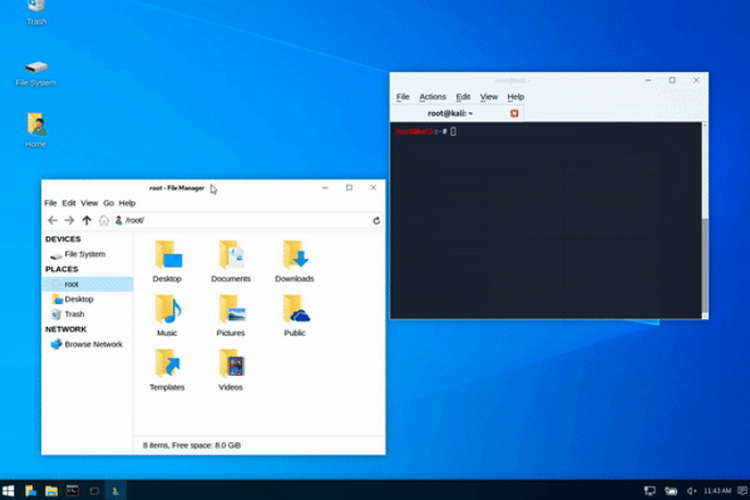
The feature is called Kali Undercover. Kali Undercover is essentially a theme that changes your Kali theme to look similar to a Windows theme. This way, people will be less curious to know what you’re doing as they will be presented with the familiar Windows user interface.

All you have to do is turn on Kali Undercover mode which can be done by simply typing “kali-undercover” in the Terminal. Running the script again switches your theme back to the Kali theme. Cool, right? Take a look at the demonstration below to know what to expect from Kali Undercover mode.

In addition to this, Kali Linux 2019.4 release brings some new features and improvements including the Xfce desktop environment, a new GTK3 theme, Kali NetHunter KeX – Full Kali desktop experience on Android, BTRFS as the root file system, PowerShell, and kernel version bump to 5.3.9.

The blog post also mentions that 2019.4 will be the last release with support for 8GB SD cards on ARM. From the next 2020.1 release, a 16GB SD card will serve as the bare minimum. However, you can create your own image that supports smaller cards.

So, what do you think of Kali Undercover mode? If you’re a Kali Linux user, will you consider using the boring Windows theme in public to avoid unwanted attention? Let us know in the comments.

Download Kali Linux 2019.4

from Beebom https://beebom.com/theme-makes-kali-linux-look-like-windows/

Electric Pickups to Become Mainstream in the US by 2021 https://beebom.com/wp-content/uploads/2019/11/tesla-cybertruck-launched-featured.jpg

With the reveal of the Tesla Cybertruck and the attention it received from customers, it appears like a lot of other automakers in the U.S have got interested to join the electric pickups market.

As Reuters reports, eight U.S. automakers including Tesla are planning to launch their electric pickup trucks by 2021. Apart from Tesla, the companies interested in electric pickups are General Motors, Lordstown Motors, Bollinger Motors, Hercules Electric Vehicles, Atlis Motor Vehicles, Rivian, and Ford.

General Motors recently went public with its timeline for electric pickups during its investor’s day. According to analysts, these companies are planning to build up to 250,000 pickups a year by 2024.

However, the sales of these trucks are not predicted to exceed 70,000 a year, as per Sam Fiorani, AutoForecast Solutions analyst. With that said, it will be interesting to see how the market for electric pickup trucks booms up in the coming years.

At the time of writing this article, Tesla’s Cybertruck hit 250,000 pre-orders, according to Tesla CEO Elon Musk. From this, it is evident that people are indeed interested to get their hands on the futuristic electric pickup truck offering from Tesla despite its controversial design aesthetics which may not be appealing to some. But hey, at least you can wrap it up with a cool-looking skin.

Amazon and Ford-backed Rivian is one of the significant newcomers in the electric pickup market. The company’s R1T is set to go into production next year and starts at a price of $69,000.

So, what are your thoughts on electric pickup trucks? Would you prefer them over conventional pickup trucks? Let us know in the comments.

from Beebom https://beebom.com/electric-pickups-become-mainstream-us-2021/

This Guy Made a Dating App Featuring Just Himself https://beebom.com/wp-content/uploads/2019/11/singularity-dating.jpg

With dating apps like Tinder and Bumble being filled with a variety of choices, it can get quite difficult to match with a person that you might actually sync with. Well, not anymore. Enter Singularity, a new dating app for women that does not shower you with multiple choices. Instead, you end up with the creator of the app.

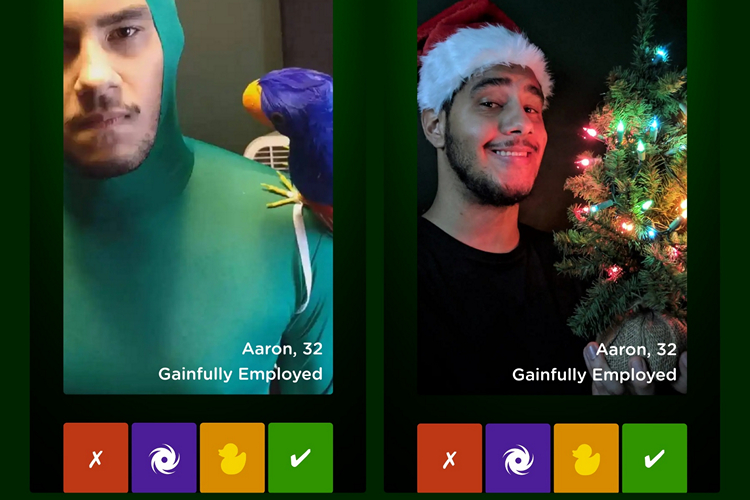
Yes, you read that right. The only person featured in Singularity is Aaron Smith, the guy behind the app. No matter how far or long you swipe through the app, you will be seeing pictures of just him.

Aaron’s profile on Singularity Dating reveals that he is 32 years old, and “gainfully employed”. The website does have a few other people namely 29-year-old Corey, Jeremy who is a 33-year-old Entrepreneur at Vector Marketing, and Artyom, a 37-year-old Engineer at Internet Research Agency. Spoiler alert: They’re all just Aaron himself.

Aaron Smith also happens to be a YouTuber. His YouTube channel is called Aaron Loves Gear, where you can mainly find guitar videos. In his YouTube channel, Smith has a commercial for his app, which sounds quite funny.

“By utilizing the latest in personality analysis and machine-learning technology, Singularity saves you countless hours of swiping by just matching you with me,” Smith says in the video.

Smith has cleverly linked his Facebook profile and email address at the end of the website saying “Yes, this is a joke. But what if it isn’t?”. I really hope he manages to find a girl after putting in all these efforts for finding a date.

Check out the witty video of Singularity below and let us know if you have found any such funny yet clever ideas for standing out of the crowd in dating apps in the comments.


from Beebom https://beebom.com/this-guy-made-a-dating-app-featuring-just-himself/

Alexa Can Now Express Excitement and Disappointment https://beebom.com/wp-content/uploads/2019/09/farmto-table-1-10.jpg

All the Alexa-powered Echo devices launched at Amazon hardware event

Amazon is adding more liveliness to Alexa’s voice. Starting earlier this week, the tech giant announced that developers can enable a feature that makes Alexa sound in a  “happy/excited” or “disappointed/empathetic” tone in the US.

The company recommends using this new happy/excited tone in a scenario where the user correctly answers a trivia question or wins a game. On the other hand, disappointed/empathetic tone is suggested for letting users know sad or disheartening news.

In addition, Alexa can now respond in a speaking style specific to the content. Notably, Amazon added an Australian news accent specific to users in Australia. “Speaking styles are curated text-to-speech voices designed to create a more delightful customer experience for specific content. For example, the news speaking style makes Alexa’s voice sound similar to what you hear from TV news anchors and radio hosts.”, states Amazon’s blog post.

The company mentions that its news style was perceived to be 31% more natural than Alexa’s standard voice. For the music style, people found Alexa’s new voice to be 84% more natural than the standard voice.

If you’re interested to get an idea regarding what changes these voices bring in and how they actually sound, listen to the videos below. Also, check out our coverage of cool Alexa commands to get the best out of Amazon’s voice assistant.

Alexa Emotions: Excited – Low Intensity

Alexa Emotions: Excited – Medium Intensity

Alexa Emotions: Excited – High Intensity

Alexa Emotions: Disappointed – Low Intensity

Alexa Emotions: Disappointed – Medium Intensity

Alexa Emotions: Disappointed – High Intensity

Coming to the speaking styles, listen to the standard voice and speaking style voice for news and music below.

News (US) Standard Voice

News (US) Speaking Style

News (AU) Standard Voice

News (AU) Speaking Style

Music (US) Standard Voice

Music (US) Speaking Style

So, which new speaking style do you prefer? Tell us in the comments.

from Beebom https://beebom.com/alexa-can-express-excitement-disappointment/

Google Explains Astrophotography Mode on the Pixel 4 https://beebom.com/wp-content/uploads/2019/11/Pixel-4-Camera-shutterstock-website.jpg

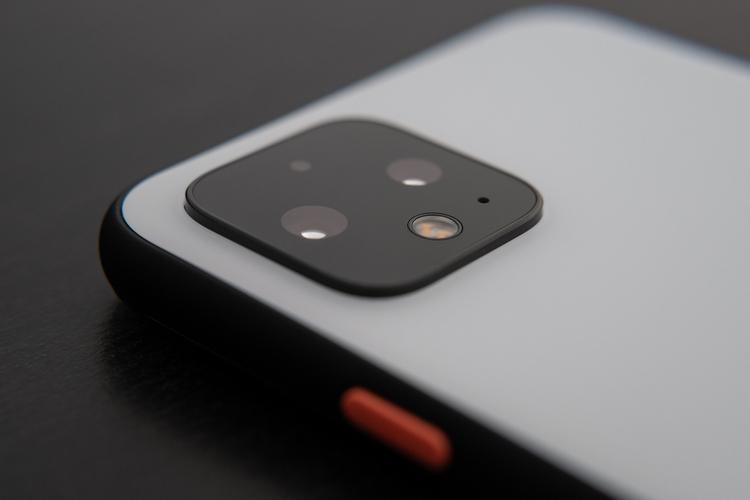
One of the unique selling points of the Google Pixel 4 apart from Motion Sense has got to be the cameras. With the Pixel 4 series, Google has stepped up its camera with new features, one being the Astrophotography mode. Google’s AI team has now explained how the feature works behind the scenes.

Soon after launching the Night Sight feature with Pixel 3, the software giant learned that viewers will tolerate motion-blurred clouds and tree branches in an image if it looks sharp otherwise but they do not tolerate “motion-blurred stars that look like short line segments”.

As a workaround, the company “split the exposure into frames with exposure times short enough to make the stars look like points of light”. They noted that the per-frame exposure time should not go over 16 seconds while taking shots of the night sky.

Google also noticed that a majority of people do not prefer to wait more than four minutes for capturing a photo, which made them limit the number of frames to 15.

Other factors including dark current and hot pixels, scene composition, autofocus, and sky processing were considered by Google so that you can get the perfect low light shots.

“Dark current causes CMOS image sensors to record a spurious signal, as if the pixels were exposed to a small amount of light, even when no actual light is present…Due to unavoidable imperfections in the sensor’s silicon substrate, some pixels exhibit higher dark current than their neighbors. In a recorded frame these “warm pixels,” as well as defective “hot pixels,” are visible as tiny bright dots.”, states Google AI team in a blog post.

You must have noticed that some images shot on Night Sight tend to look so bright that you get confused about the time of the day. Well, Google tries to mitigate this issue by “selectively darkening the sky in photos of low-light scenes.”

In order to achieve this, Google uses an “on-device convolutional neural network, trained on over 100,000 images that were manually labeled by tracing the outlines of sky regions, identifies each pixel in a photograph as ‘sky’ or ‘not sky’“.

Google has shared a few tips and tricks to take better night shots which you can check out here. Also, if you want to use these awesome features but don’t have a Pixel 4, don’t worry. Just check out our article on how to install GCam Mod on any Android smartphone and use the incredible Google Camera features on your device.


from Beebom https://beebom.com/google-explains-astrophotography-mode-on-the-pixel-4/

Huawei Sound X Is a Smart Speaker Exclusive to China https://beebom.com/wp-content/uploads/2019/11/huawei-soundx.jpg

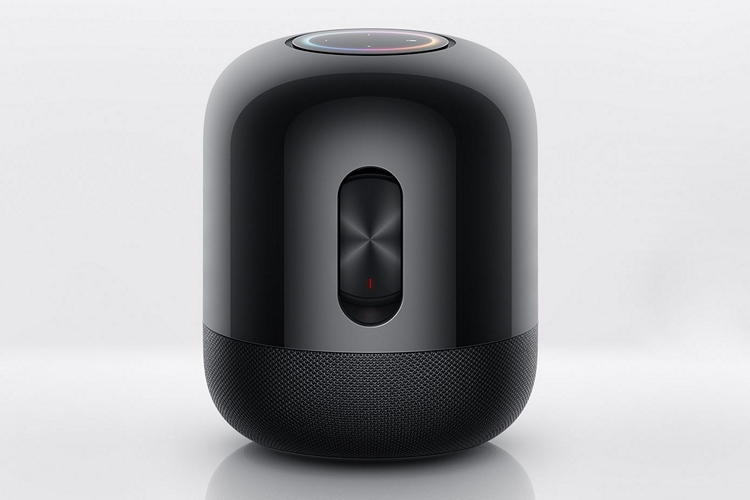
Huawei unveiled the Sound X, a smart speaker built in partnership with French audiophile-grade equipment maker Devialet earlier this week in China. Judging by the looks, it certainly looks somewhat similar to Apple’s HomePod.

However, we are not here for the looks. Let’s get to the specifications of the Sound X. Firstly, Sound X is a 360-degree speaker with a 60-watt double subwoofer. Thanks to the collaboration with Devialet, Sound X comes with the company’s Speaker Active Matching technology (SAM) that reduces distortion in audio and push-push woofer vibration-canceling technology, as Engadget reports.

The speaker has a convenient one-touch control and Huawei’s HiLink smart home control. For voice commands, it comes with Huawei’s “Xiaoyi” voice assistant that supports Huawei Music.

In case you’re wondering, Huawei Sound X is a Hi-Res certified speaker capable of producing lossless audio output. It has a diameter of 165mm, a height of 203mm, and weighs 3.5kg. It also supports pairing two Sound X speakers at once for the stereo effect.

It is worth noting that this is not the first time Huawei is coming up with a smart speaker that resembles popular smart speakers. In fact, the company launched a Google Home lookalike speaker with Alexa and a HomePod resembling speaker last year.

As far as the pricing is concerned, Sound X will retail at 1,999 Yuan which roughly translates to Rs.20,000. For those interested to buy 2 units for that stereo experience, Huawei offers it for 3,888 Yuan. The smart speaker will be sold exclusively in China and the pre-orders have already begun.

Sound X got announced by Huawei along with Huawei MatePad Pro, the Chinese tech giant’s reply to Apple’s iPad Pro. So, what are your thoughts on Sound X? Tell us in the comments.

Check-out Huawei Sound X Smart Speaker

from Beebom https://beebom.com/huawei-sound-x-smart-speaker-exclusive-china/

Apple AirPods Shipments Reportedly Double to 60 Million in 2019 https://beebom.com/wp-content/uploads/2019/11/airpods-pro.jpg

There is no doubt that Apple’s AirPods have evolved to be a tech-lifestyle accessory rather than being just a pair of wireless earbuds. A recent report from Bloomberg suggests that the shipments of AirPods are expected to double up to 60 million in 2019.

As Bloomberg reports, this is happening because of a “much higher” than expected demand for the AirPods Pro that retails at a whopping $249 or Rs. 24,900 in India. Clearly, people gave a warm welcome to the Cupertino giant’s first noise-canceling earbuds.

However, achieving that target depends on the assemblers and production units of Apple. It remains to be seen how the company manages to pull-off this increasing demand. Right now, AirPods are manufactured by Taiwan-based Inventec Corp, China’s Luxshare Precision Industry,  and Goertek Inc. for Apple.

The demand for AirPods is not declining anytime soon. In fact, as per the survey conducted by Piper Jaffray, AirPods are the most desired tech product by teenagers this holiday season. It is indeed surprising to see such demand for a pair of wireless earbuds that can hardly be repaired in case something goes wrong.

This trend would certainly hurt the competitive offerings like Samsung’s Galaxy Buds and Sony WF-1000XM3. However, it will be interesting to see how the AirPods Pro stacks up against Google’s upcoming Pixel Buds 2 and Microsoft’s upcoming Surface Buds.

If you are planning to buy AirPods this holiday season, do not forget to check out our in-depth comparison of the AirPods 2 and the AirPods Pro to get the right one that suits your needs. If you end up picking the AirPods Pro, you might as well carry them in style with one of these cases and skins.

from Beebom https://beebom.com/apple-airpods-shipments-reportedly-double-60-million-2019/

TikTok Campaign Helps to Raise Awareness Against Gender Violence in India https://beebom.com/wp-content/uploads/2019/04/TikTok-Ban-Lifted.jpg

TikTok and UN Women have joined hands for a campaign called #KaunsiBadiBaatHai to raise awareness for violence against women in India. This collaboration is part of the global 16 days of activism against gender violence “Orange the World” that started earlier this week on November 25 which is observed as the International Day for the Elimination of Violence against Women.

TikTok users willing to take part in the campaign are asked to submit a video by syncing lips to a rap soundtrack by Delhi-based 16-year old rapper Abbas Ali from Slam Out Loud.

“UN Women is committed to making spaces safe for women and young girls, for violence against women and young girls has real consequences and costs. Through our proud partnership with TikTok for this campaign, we hope to raise awareness and unite users to break the silence around violence.”, says Nishtha Satyam, deputy country representative, UN Women India.

At the time of writing this article, the hashtag has received over 752 million views and several video submissions. If you are interested to make your own submission, you may do so from here.

“At TikTok our mission is to inspire and enrich people’s lives and give them an outlet to express themselves in a way that adds value to the community. We are proud to collaborate with UN Women India for this campaign as their community partners and believe that the highly engaged community on TikTok has the potential to contribute towards a change in society and spread the message of a violence-free world.”, said Nitin Saluja, director, public policy, TikTok India.

The campaign is time-bound, and hence, if you are willing to take part in the campaign, make sure you do it before 10th of December, which is celebrated as the International Day of Human Rights.

from Beebom https://beebom.com/tiktok-campaign-helps-raise-awareness-against-gender-violence-india/

Netflix Reopens Paris Theatre in NYC for Its Originals and Events https://beebom.com/wp-content/uploads/2019/11/netflix-paris-theatre.jpg

netflix paris theatre

Netflix announced its plans to reopen New York City’s Paris Theatre to make it a “home for special Netflix events, screenings, and theatrical releases” earlier this week. The company said that it had signed a lease agreement to keep the theater open until an undisclosed timeline.

“After 71 years, the Paris Theatre has an enduring legacy, and remains the destination for a one-of-a kind movie-going experience. We are incredibly proud to preserve this historic New York institution so it can continue to be a cinematic home for film lovers.”, said Ted Sarandos, Netflix’s Chief Content Officer in a press release.

Notably, the theater was closed earlier this year and got opened for a limited time screening of Netflix Originals movie Marriage Story. For those unaware of the legacy of Paris Theatre, the theatre first opened in 1948 and showed French films. It screened some classic films including La Symphonie Pastorale, Franco Zeffirelli’s Romeo and Juliet, Claude Lelouch’s A Man And A Woman, and Marcello Mastroianni’s Divorce Italian Style.

By this reopening, Paris Theatre will reclaim its position to be the last single-screen theater in New York City. Incredible, isn’t it?

However, this is not the first attempt by Netflix to acquire a movie theatre. According to a report from Deadline, the company was in talks to gain control over Egyptian Theatre in Los Angeles.

I know a lot of us won’t be able to visit this iconic theatre anytime soon. However, what you can do is stream the rich library of Netflix right from your home. While you’re at it, do not forget to check out our curated list of movies and TV series to help you set the mood for a chilled weekend.

from Beebom https://beebom.com/netflix-reopens-paris-theatre-nyc-its-originals-events/

Amazon Translate Now Supports 22 New Languages https://beebom.com/wp-content/uploads/2019/11/amazon-web-services-ft..jpg

Amazon has added support for 22 new languages in Amazon Translate, the tech giant’s real-time translation service earlier this week. With this addition, Amazon Translate now supports a total of 54 languages & dialects, and 2804 language pairs.

The languages that newly gained support in Amazon Translate are as follows: Afrikaans, Albanian, Amharic, Azerbaijani, Bengali, Bosnian, Bulgarian, Croatian, Dari, Estonian, Canadian French, Georgian, Hausa, Latvian, Pashto, Serbian, Slovak, Slovenian, Somali, Swahili, Tagalog, and Tamil.

In addition, Amazon also announced that Amazon Translate is expanding to six new AWS regions, making the number of Amazon Translate supported AWS regions to 17. The newly added regions where customers can use Translate are US West (N. California), Europe (London), Europe (Paris), Europe (Stockholm), Asia Pacific (Hong Kong) and Asia Pacific (Sydney).

“This expansion is great news for many customers who will now be able to translate data in the region where it’s stored, without having to invoke the service in another region. Again, this will make workflows simpler, faster, and even more cost-effective.”, wrote the company’s representative in a blog post.

If you want a new language to be supported by Amazon Translate, you may request the same on the AWS Forum here.

In other news, Amazon Web Services announced Custom Labels for Rekognition to allow customers to build ML models for detecting unique objects and scenes aimed at specific use-cases. This could eliminate the need for training a model which could be inefficient if there is a lack of labeled images. Also, users without any expertise in Machine Learning can benefit from this feature starting December 3rd.

So, are you excited to try out Amazon Translate in a newly supported language? Let us know in the comments.

from Beebom https://beebom.com/amazon-translate-now-supports-22-new-languages/

Gaming Creates Carbon Emissions Equivalent to 5 Million Cars: Study https://beebom.com/wp-content/uploads/2019/08/Curved-Gaming-Monitor-shutterstock-website.jpg

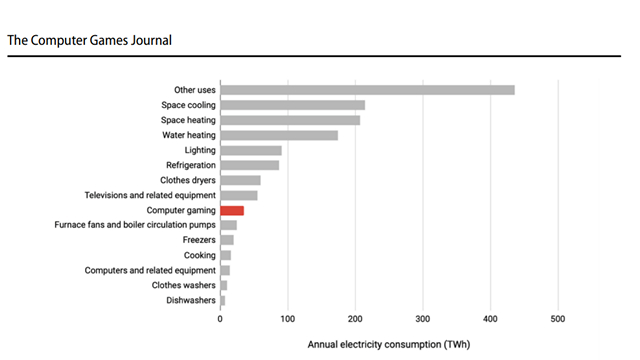
According to a new study, it has been found that gamers in the US consume about 34 terawatt-hours of energy every year, which is equivalent to the carbon emissions from more than 5 million cars.

The study “Toward Greener Gaming: Estimating National Energy Use and Energy Efficient Potential” got published in The Computer Gamers Journal. The researchers note that the electricity consumed by gamers account for 2.4% of residential electricity. Take a look at the below image for a comparative analysis of annual electricity consumption in the US.

As per the findings, consoles were responsible for 66% of power consumption when it comes to gaming. PC desktops accounted for a much lower 31% while laptops consumed a mere 3%.

Even though PCs were responsible for comparatively lower power consumption, the researchers say that PCs tend to be less efficient than consoles on high-end gaming setups including overclocked CPUs and multiple 4K gaming monitors.

The study doles out various recommendations to make the overall efficiency of gaming setups better like using in-game diagnostics. It recommends avoiding the use of overclocked CPUs and 4K displays that consume a significant amount of power. Using V-Sync is also recommended as the researchers found it to reduce energy use up to 39%.

“Targeted hardware and software strategies can reduce the gaming energy use by approximately half, while maintaining or improving metrics of user experience. In addition to system designers, gamers and game developers can play a significant role in managing the energy required for gaming”, notes the researchers.

If you’re interested to read the entire study, check out the article here. So, what do you think of these findings? Let us know your thoughts in the comments.

from Beebom https://beebom.com/gaming-creates-carbon-emissions-equivalent-to-5-million-cars-study/

This App Lets You Keep Track of the Time You Spend on Your PC https://beebom.com/wp-content/uploads/2019/11/activitywatch.jpg

activitywatch

Have you ever wanted a way to keep track of how you’re spending time on your PC? ActivityWatch might just be the tool you’re looking for.

ActivityWatch is a time-tracking software that helps you keep an eye on all your activities on your machine. The developer claims it to be an attempt to replace existing apps like RescueTime, ManicTime, and WakaTime.

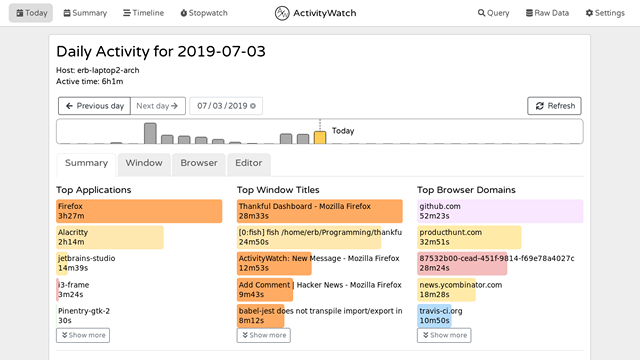
The app shows you a detailed summary of the time you spend on various applications on your PC. It has various categories like “Top Applications”, “Top Window Titles”, and even “Top Browser domains” so that you can get a better idea.

Credits: ActivityWatch

“Top Browser domains” lets you know the website on which you spend the most time on while “Top Window Titles” shows the tab name you use extensively. You also get an option to filter out the time you were away from the keyboard to get the exact time statistics by checking the “Filter away AFK time” checkbox.

In case you’re wondering, ActivityWatch is open-source and you can view the source code of the app here. Thanks to its cross-platform nature, ActivityWatch is available on Windows, Linux, and macOS.

You can simply run the executable file on Windows to install ActivityWatch on your Windows machine. For other platforms, unzip the archive and run “./aw-qt” in the installation directory. Refer to the official installation guide here in case you run into issues during the installation process. You can also follow this guide to install ActivityWatch from the source.

Check out ActivityWatch from the link below and let us know if you found this helpful in the comments.

Download ActivityWatch(Windows, Linux, macOS)

from Beebom https://beebom.com/app-lets-you-keep-track-time-you-spend-your-pc/

eBay Now Lets Android Users Use Face/Fingerprint Recognition on its Mobile Website https://beebom.com/wp-content/uploads/2017/11/eBay-Logo-Shutterstock-KK.jpg

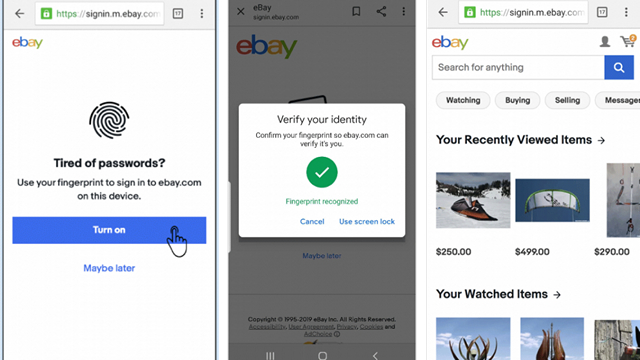
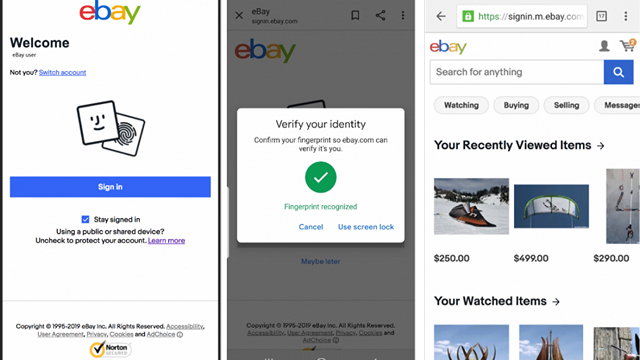
Tired of entering passwords every time you log in to eBay on a mobile web browser? Worry not, the e-commerce giant has implemented a password-less login experience that will allow Android users to make use of biometric sensors to seamlessly login to eBay.

eBay has implemented this new authentication technique based on WebAuthn, a new standard of biometric-based authentication for web browsers. You will be prompted to enable fingerprint/face recognition the next time you visit the web version of eBay on Chrome as you can see below.

Credits: eBay

Once you have enabled the feature, you can easily use your phone’s biometric authentication to log in to your eBay account, just like you unlock your smartphone. Alternatively, you can use the screen lock to login to the website.

Credits: eBay

The feature is compatible with version 75 and higher of the Chrome browser. In case this feature is not working on your device, make sure your Chrome browser is updated to the latest version available on the Google Play Store. While we are on the subject of Chrome, you should check out these cool Chrome Flags for mobile devices.

The blog post of eBay mentions that support for more platforms will be added in the future. With this implementation, eBay has set the lead among other e-commerce giants for a seamless login experience for its customers and sellers. I hope more companies adopt this standard on their mobile websites.

It is worth noting that this is not the first time we’re seeing biometric authentication on eBay. In fact, the company’s Android and iOS apps allow users to authenticate with biometric sensors for quite some time now.

So, would you prefer signing in to popular websites using facial recognition or fingerprint sensor rather than passwords? Tell us in the comments.

from Beebom https://beebom.com/ebay-lets-android-users-use-face-fingerprint-recognition-mobile-website/

This $6,700 iPhone 11 Pro Has a Piece of Steve Jobs’ Roll-Neck https://beebom.com/wp-content/uploads/2019/11/caviar_11pro_superior_jobs.jpg

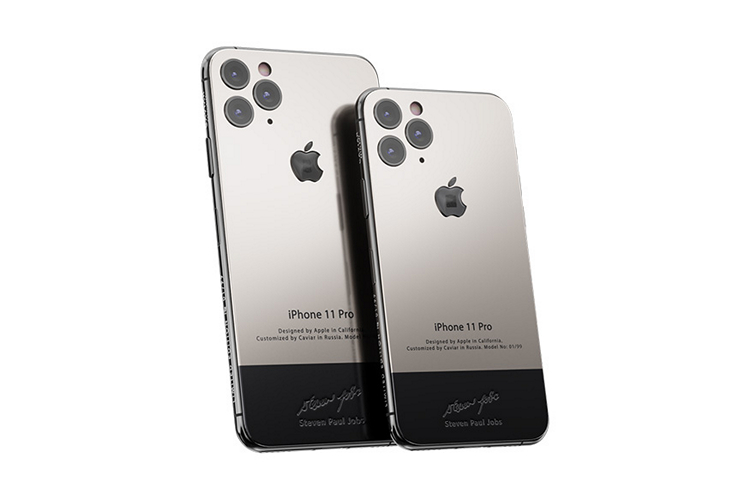
Just in case the new iPhone 11 Pro series sounds affordable to you, Russian luxury iPhone maker Caviar might have exactly what you’re looking for. Caviar now offers a special limited edition of the iPhone 11 Pro and iPhone 11 Pro Max that could help you make a really expensive show-off.

Named the “iPhone 11 Pro Superior Jobs”, the device flaunts a design similar to the original iPhone as a move to pay tribute to the “immortal genius”. The Apple logo in the rear comes embedded with a tiny piece of the black roll-neck sweater worn by Steve Jobs. At the bottom, there is an autograph of Steve Jobs.

“As a tribute to the immortal genius, Caviar creates a model of the new iPhone 11 Pro in the style of that first iPhone model that has become a breakthrough in the world of technologies. The strict Apple design is embodied in the body of firm titanium: only clear lines and moderate color solution.”, describes Caviar’s product page.

The price of the iPhone 11 Pro Superior Jobs edition series starts at $6,700 and goes up to $7,880 for the maxed-out version. To put that in perspective, the regular iPhone 11 Pro Max 512 GB variant officially retails at $1,449.

In other news, Caviar also has special editions paying tribute to boxer Mohammad Ali starting at $20,780 and English rock band The Beatles starting at $15,760. Unlike the Superior Jobs edition, the number of units is lesser for these editions. The iPhone 11 Pro Superior Ali & Frazier will be limited to three pieces while the iPhone 11 Pro Superior The Beatles will be a one-off.

So, what are your thoughts on these luxury iPhones? Let us know in the comments.

Check-out Caviar iPhone 11 Pro Superior Jobs

from Beebom https://beebom.com/luxury-iphone-11-pro-has-piece-steve-jobs-roll-neck/

Top 1% App Publishers Responsible for 80% of New App Downloads : Report https://beebom.com/wp-content/uploads/2019/11/app-download-stats.jpg

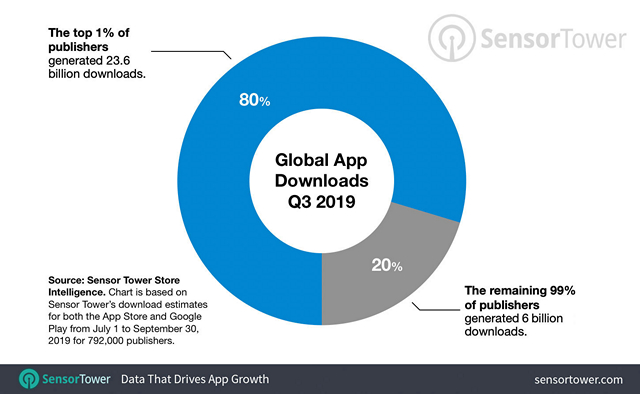
A recent report from Sensor Tower reveals that the top 1% of publishers across the App Store and Google Play Store accounted for 80 percent of new app downloads. The data is calculated from Sensor Tower’s Store Intelligence platform during Q3 of 2019.

According to the report, there were 29.6 billion app downloads in the third quarter of this year out of which 23.6 billion apps were from the top 7,920 app publishers leaving the rest – 784,080 publishers with a comparatively low 6 billion app downloads.

Image credits: Sensor Tower

The report covered the download statistics for games as well. Here, the influence of top game publishers is a bit higher and stands at 82%. According to Sensor Tower, the top 1% (1,080 game publishers) were responsible for 9.1 billion downloads while the rest of the 106,920 game publishers accounted for just 2 billion downloads.

In terms of revenue, the top 1 percent of app publishers generated $20.5 billion while the rest generated $1.5 billion. As far as the games are concerned, the figures are at $15.5 billion for the top game publishers and $800 million for the rest of the game publishers.

It is worth noting that the top three highest-earning game publishers are Tencent with $2 billion, NetEase with $743 million, and Bandai Namco with $503 million.

“In a continually growing market where most publishers are competing against the publishers controlling 80 percent of all new user acquisition, standing out among the competition is more crucial than ever.”, notes Sensor Tower.

With this data, it is evident that people are less likely to try out new apps and games developed by indie and less known developers and are probably sticking with the offerings of top publishers. If you are interested to try out some new casual games in your Android smartphone, check out our list on the same here.

So, what do you think of these findings? Let us know in the comments.

from Beebom https://beebom.com/top-1-app-publishers-responsible-for-80-of-new-app-downloads-report/

This App Brings Back Notification Tickers on Android https://beebom.com/wp-content/uploads/2019/11/tinynotif-ft.-e1575107400817.jpg

Tinynotif

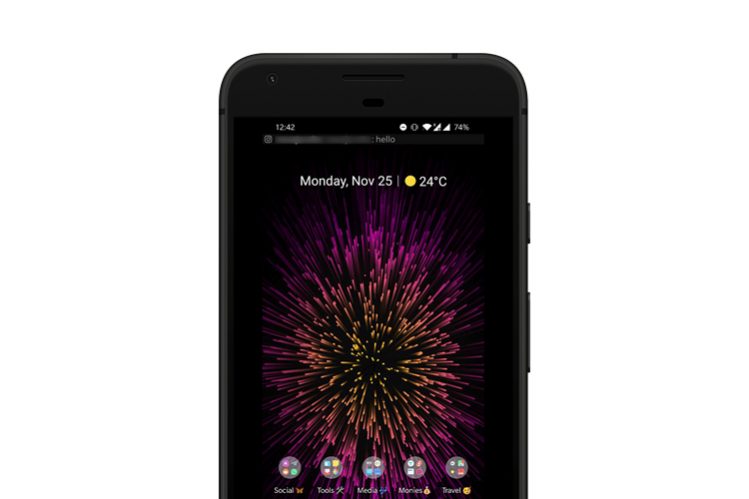
With Android Lollipop, Google brought heads-up notifications to Android and bid goodbye to notification tickers. Heads-up notifications are useful for quickly drawing attention to the notifications but it can be annoying when a notification suddenly covers up a portion of your screen while you’re watching a video or a movie. To solve this problem, a developer has come up with a new app named TinyNotif that brings back the good-old notification tickers on newer Android devices.

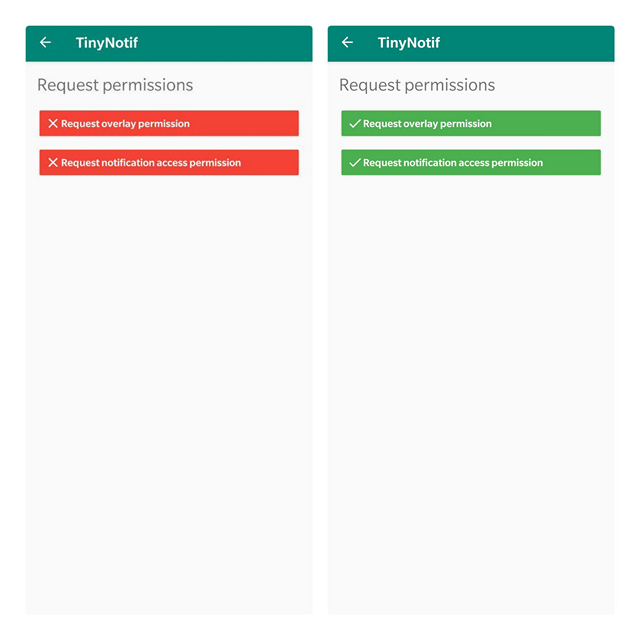
To get started, you will have to allow the necessary permissions. You can set the permissions by tapping on the “Request Permissions” button. On tapping the button, TinyNotif will request overlay and notification access permissions for the app to trigger the notification ticker every time a new notification comes in your phone.

Once you’re done setting permissions, you will have to disable heads-up notifications to avoid duplicate notifications. You can achieve this by three methods – using ADB command, using DND mode, or manually disabling notifications for every app.

I would recommend you to use the ADB method as it is a one-time process. Connect your phone to your PC and run the ADB command given below to disable heads-up notifications.

adb shell settings put global heads_up_notifications_enabled 0

In case you wish to revert the changes and enable heads-up notifications later, simply run the same command by replacing the 0 at the end by 1. You can use the DND mode to temporarily achieve the same but it comes at the cost of muting your phone.

The app also offers you the ability to tweak the font size and scroll speed of the notification ticker so that you can customize it as per your preference.

Check out TinyNotif from the link below and let us know if you found this helpful in the comments.

Download TinyNotif (Free)

from Beebom https://beebom.com/bring-back-notification-tickers-android/

Huawei Watch GT 2 India Launch Set for December 5 https://beebom.com/wp-content/uploads/2019/11/shutterstock_1557686081-e1575115621964.jpg

Huawei Watch GT2 india launch

We recently learned that Huawei is looking to bring its smart wearables, powered by the company’s own Kirin A1 chipset, to India soon. This was followed by rumors that Huawei Watch GT 2 is launching in the country in the first week of December. And it now seems like the rumors were indeed true.

Huawei has today sent out media invites for the Huawei Watch GT 2 launch event, which has been scheduled for December 5 next week. The teaser shows off its circular dial and boasts about the two-week battery of the smartwatch. There’s currently no word on whether Huawei will launch its Kirin A1-powered Freebuds 3 at the launch event in India.

huawei watch gt 2 invite

Watch GT2 launched alongside the Huawei Mate 30 Pro a couple of months ago. It will be available in two variants — a 42mm variant with a 1.2-inch AMOLED display and a 46mm variant with a 1.39-inch AMOLED display. It is powered by the Kirin A1 chipset, which was unveiled earlier this year as the first-ever wearable chipset to support Bluetooth 5.1 and Bluetooth 5.1 LE simultaneously.

Kirin A1 uses ultra-energy-efficient ARM Cortex-M7 cores for industry-leading 10uA/MHz energy consumption rates. Huawei Watch GT 2 runs the company’s own LiteOS and has GPS, heart rate sensor, 6-axis gyroscope, and other sensors for fitness tracking. You can leave your phone behind, thanks to GPS support, and it’s water-resistant up to 5ATM.

Huawei Watch GT 2 has already been listed on the company’s website. It will be available for purchase on both Amazon and Flipkart, with ‘Notify Me’ landing pages live already. We already know the specifications for this smartwatch, so all that’s left now is the price and availability details next week. Huawei Watch GT 2 is priced at 229 euros, so it could cost around Rs. 18,000 in the country.

from Beebom https://beebom.com/huawei-watch-gt-2-india-launch-set-for-december-5/

‘JoviOS’ May Soon Replace FunTouch OS, Teases Vivo https://beebom.com/wp-content/uploads/2019/11/JoviOS-website.jpg

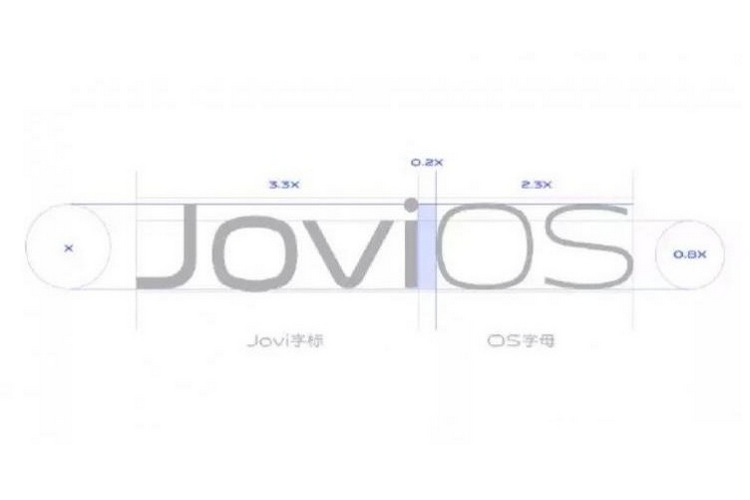
Vivo may be planning to ditch its custom Android-based skin in favor of a new UX in the not-too-distant future. According to a new teaser posted on Chinese social media, the company is working on a ‘JoviOS’, which might potentially replace the awkwardly-named FunTouch OS in future Vivo smartphones. The teaser was posted earlier this week by a Funtouch OS Project Manager on Weibo without any further details on the subject.

As can be seen in the image above, the JoviOS logo seems like more of a rough sketch than the final design, but the presence of Chinese characters seem to suggest that the change will be made both in the Chinese and the global versions of the software. Other than that, there’s no official info for now, so we might have to wait a while to get more info on the subject.

In case you don’t know it already, Jovi is the name of Vivo’s voice-based personal assistant, which means AI-based software might be the central theme of the new ROM. Other than that, we can’t speculate about its features at this point in time, so lets just hope that the company will announce more details sooner rather than later.

It’s worth noting here that Vivo has already scheduled an event on December 9 to launch the V17 in India, so it will be interesting to see if there will be any announcement regarding JoviOS on that day. However, I won’t be holding my breath if I were you.

Featured Image Courtesy: Vivo (via Weibo)

from Beebom https://beebom.com/jovios-replace-funtouch-os/

Galaxy S11 May Not Use Ultrasonic Fingerprint Scanner Following Security Scare https://beebom.com/wp-content/uploads/2019/11/Galaxy-S10-Fingerprint-shutterstock-website.jpg

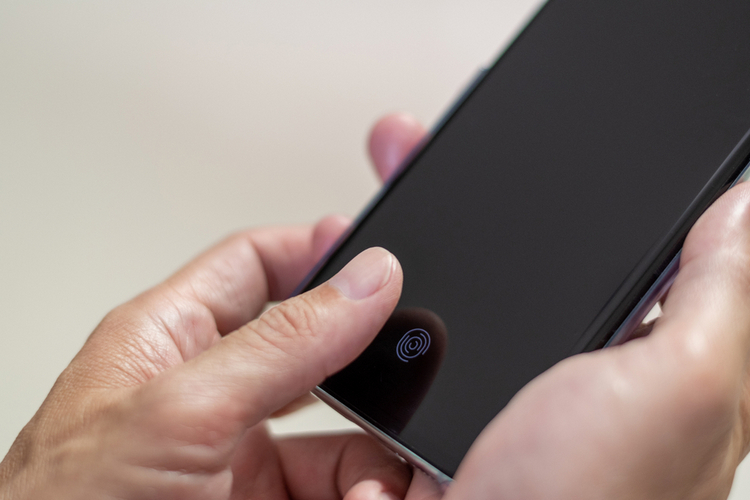
With leaks about the Galaxy S11 becoming more of a torrent in the run-up to the device’s launch next year, a new report now suggests that Samsung might ditch a popular feature from its next-gen flagship smartphone following a recent security scare. According to Mashable, Samsung Securities analyst, Lee Jong-wook, has claimed that the South Korean company may ditch the in-display ultrasonic fingerprint scanner in favor of other biometric authentication protocols in the Galaxy S11 lineup.

Samsung is said to be mulling the extreme step following reports that the ultrasonic fingerprint scanners in the Galaxy S10 were authenticating any fingerprint when the display had a simple screen-protector installed. While Samsung was quick to fix this issue, the problem created a major headache for both the company and end-consumers after many financial and security applications proactively blocked the use of the fingerprint scanners on the affected phones, forcing people to use pins or patterns for their own security.

While the blog goes on to speculate that Samsung might resort to hardware-based facial recognition (a la Apple) instead of fingerprints in its Galaxy S11-series devices, it would be interesting to see if the company will, indeed, implement a new biometric process following the security scare with another.

That being the case, it won’t be a major surprise if the company goes back to optical in-display scanners, or even use the tried and tested physical fingerprint scanners in its next-gen flagship smartphones. Both will be financially more viable for Samsung as well, given that it will be able to buy the hardware from South Korean or Chinese suppliers at lower rates than having to pay higher prices to Qualcomm.

from Beebom https://beebom.com/galaxy-s11-ultrasonic-fingerprint-scanner-security-issue/

This App Uses Eye-Tracking to De-Stress Your Eyes and Improve Vision https://beebom.com/wp-content/uploads/2019/11/Blink-app-website.jpg

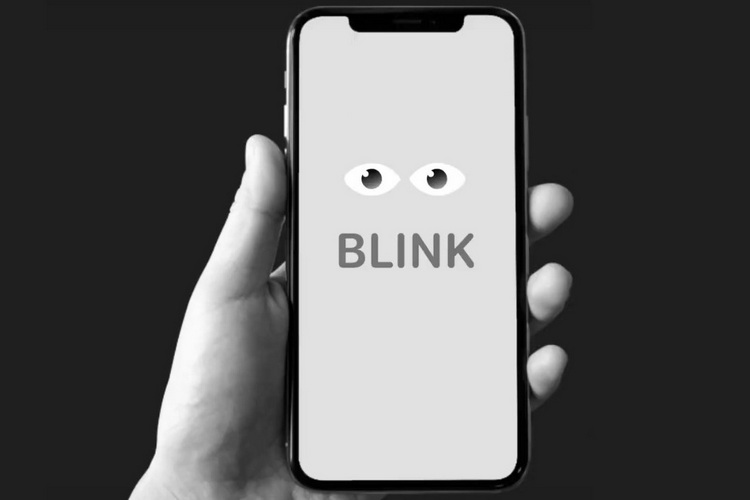
Smartphone apps claim to be able to do a lot of things this days, and an all-new iOS app called Blink now claims to be “Your first and only eye-traсking wellness assistant”. It’s a daily eyesight trainer with a number of exercises that the developers claim will strengthen your eyes and help reduce eye-strain and fatigue.

Blink comes with an unique design that activates peripheral vision, enabling users to navigate without directly looking at the screen. It is based on eye-tracking technology through the TrueDepth camera system available in iPhones X, XR, XS, XS Max, 11 or iPad Pro models, which means it won’t work as intended on other iPhone or iPad models. Curiously though, the official App Store page lists it as ‘compatible’ with a bunch of other devices, including the iPhone SE and even the age-old iPod Touch!

Blink uses the iPhones’ TrueDepth camera technology to track movement, position, blinking and winking of users’ eyes. In an official Medium post describing the working of the software, the developers said: “Our approach is to get raw dynamic data from TrueDepth camera and modify it according to individual characteristics of each user’s eye and their unique movement abilities … The goal of visual solution is specifically made to help users to use peripheral vision and check exercise progress without looking at the screen”.

The app was originally released back in July, but has started getting a ton of attention recently and, was even listed as ProductHunt’s #2 product of the day on Thursday, November 28th. It’s worth noting here that the developers behind the app doesn’t seem to point to any peer-reviewed, third-party scientific research that validates their claims, but it’s fun to play around with and, is totally free without any in-app purchases, so you can check it out on the Apple App Store.

from Beebom https://beebom.com/eye-tracking-de-stress/

New Xbox-Exclusive Games to Launch Every 3-4 Months, Says Microsoft https://beebom.com/wp-content/uploads/2019/11/Xbox-One-X-Surge-Protector.jpg

10 Best Xbox One Exclusives You Need to Play

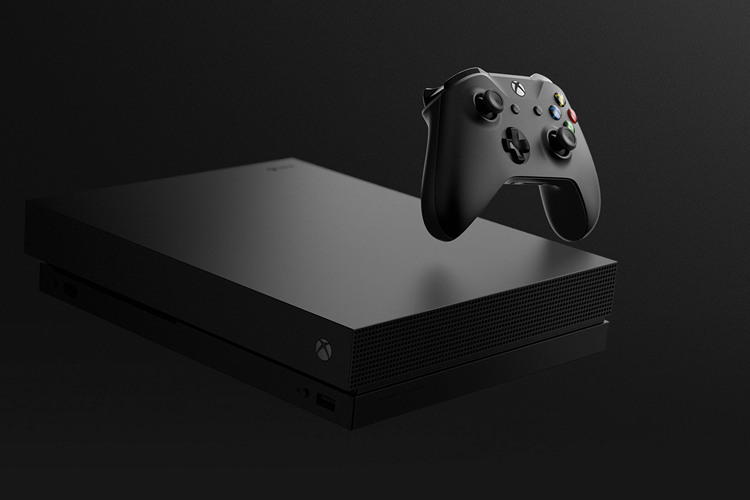
Microsoft has announced plans to launch exclusive Xbox-only games every few months. In an interview to GamesRadar, the head of Xbox Game Studios, Matt Booty, said that the company believes it would be able to churn out new, first-party games every 3-4 months without compromising on quality. “We feel really good heading into 2020. We’ve got a goal of being able to deliver a game, roughly, every three to four months”, he said.

He, however, rejected any notion that there’s been a shift in the company’s policy in looking beyond third-party games to focus on in-house titles. “I don’t think there’s been a shift … Sarah Bond, who leads our third-party team, is out there day in and day out working with our third-party partners … I think you would hear an equal amount of talk about first-party, third-party, and ID@Xbox. It’s just that, lately, we felt a little more proud about talking about what we’ve got going on with first-party”, he said.

Sadly, though, Booty didn’t reveal anything new about the next-gen Xbox console – ‘Project Scarlett‘ – that’s been confirmed to launched next year. He did, however, claimed that the device will have the largest launch line-up of any Xbox system because any game that runs on an Xbox One will run on Scarlett. “You’re not porting to a different operating system; you’re not porting to a different graphics API; you’re just running an Xbox game, right? So we hope that that’s a big advantage in terms of our initial content library”, he said.

He also tried to reassure Xbox One users that their current-gen Xbox console won’t be consigned to the bins of obscurity with the release of the new device next year, saying: “We want people to feel comfortable investing in Xbox (irrespective of whether) you’re going to go buy an Xbox One S or next fall you’re going to go buy a Scarlett. (The) content library that you invest in is going to go forward (with you], so that you don’t have to feel like you’re making a choice between generations”.

from Beebom https://beebom.com/xbox-exclusive-games-launch-3-4-months/

Top 10 Free CAD Software You Should Use https://beebom.com/wp-content/uploads/2015/08/Top-10-Free-CAD-Software-You-Should-Use-in-2019.jpg

Top 10 Free CAD Software You Should Use in 2019

Computer Aided Design — commonly referred to as CAD — has become an integral factor that moves world forward. As an industrial art, CAD let us create designs for a wide range of purposes. From designing tiny electronic equipment to large machines to designing entire buildings and dams, CAD is the first step where the process of building starts. Due to their highly professional nature, CAD software are quite expensive and not accessible to everyone. The real problem is when you’re a student or a freelancer and do not have enough money to spend on an expensive CAD app. That’s where free CAD Software can help you. While they may not be as good as the paid professional CAD tools, they are great to just get you started. So, here are the top 10 best free CAD software that you can use.

Best Free CAD Software in 2019

Here, we have a list of top 10 free CAD software. The list includes two kinds of software — totally free and students’ edition of premium software. The latter kind will be useful when your institution uses a particular tool and you need to use that too. Shall we move on to the list?

1. SketchUp

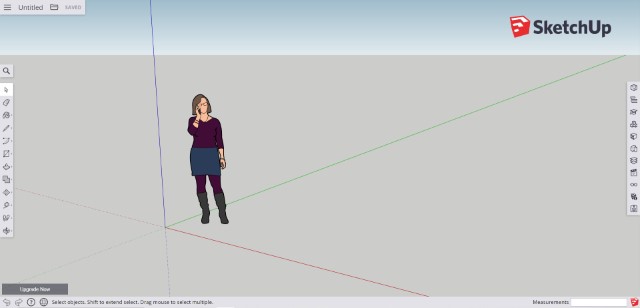
SketchUp is a popular software used for 3D Modelling in various industries such as interior design, architecture, engineering, video game design development etc. Apart from its paid offerings, the company also offers a free version of SketchUp which is great for most users. This free version is available for personal and educational use and comes with a simpler user interface. One of the noticeable additions of SketchUp include its open-source library of model assemblies and 3D Warehouse – a large-enough collection of 3D models uploaded by other users.
1. SketchUp

Also, as it’s a tool developed using Ruby, there’s support for extensions; and, the Extension Warehouse of SketchUp is an awesome feature for those who need enhanced productivity. SketchUp is available for free to use on the web however you will need to upgrade to the paid plans if you want to use its native app. If you want that, you can check out SketchUp Pro which is available for a 30 day trial. So, there’s plenty of time to check it out before you buy it. Overall, the free web version of SketchUp is great for beginners and if you happen to like it, you can seamlessly move to the paid version if you require extra features.

Visit website

2. Onshape

Onshape is a modern-age CAD software which is known for its excellent design repository and assemblies. Unlike other software programs which are standalone applications, Onshape is a cloud-based design platform. You can create complex solid and surface models just from a browser and without any fear of losing your design progress. As Onshape is a web-based platform, all your actions are saved instantly saving you from a huge loss. In computer-aided design systems, the loss of design progress is a major concern as your project expands over time. Other than that, Onshape comes with three major design tools: parts, assemblies, and drawings.

1. Onshape

You can create highly structured and detailed assemblies from its unique databased of architecture design. And for drawing purposes, you can easily import DWG, DWT or DXF files if you were working on Autodesk before. Now, you must be thinking that Onshape is a premium software, but it also offers its software to students, educators and hobbyists for absolutely free. So, what more do you want? A capable cloud-based software with all the modern tools for your design needs. In a way, Onshape is one of the best free CAD software right now.

Visit Website

3. Fusion 360

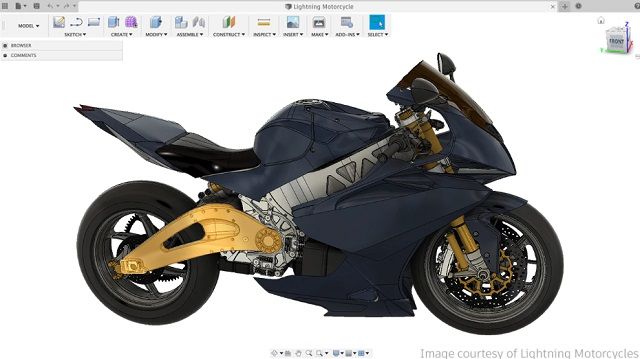
If you are new to CAD and want a simple tool to get started, there is no better option than Fusion 360. You might be surprised to find that Fusion 360 has been developed by Autodesk and kept free of charge to make computer-aided designing more interesting and also within the reach of students and creators. Similar to Onshape, Fusion 360 is also a cloud-powered CAD software and supports both 3D and 2D design. Fusion 360 stresses more on building the concepts first so you will go through all the basics of 3D Design & Modeling, Simulation, Generative Design and more.
2. Fusion 360

In addition, if you expand your project in the future, you can move it to CAM or CAE software seamlessly. That’s awesome, right? Apart from that, you can also unify design elements from different projects, create a prototype and also manufacture on a single platform. That’s the best part about a program being powered by Autodesk. All in all, Fusion 360 is one of the top free CAD software and if you are a beginner in this field then this tool is going to your trailblazer.

Visit Website

4. nanoCAD

While nanoCAD is not entirely a free CAD software, it’s definitely a lot cheaper than what the competition is offering and that is why I have mentioned it in this list. It’s a low-cost CAD software, but having advanced tools for drawing and creating 2D and 3D designs. It does not matter which industry you belong to– architecture, manufacturing or mechanical engineering– this tool offers you all the drafting and drawing extensions. The best part about nanoCAD is that it’s completely compatible with the DWG file format. So in case, if you want to move your project elsewhere in the future, this feature will have you back.

3. nanoCAD

Further, nanoCAD brings several end-user APIs which can be used to automate complex CAD designs. It can particularly help those companies who regularly create similar products without having to go through the grinding drafting phase. Also, nanoCAD is an offline application so those who like working on a standalone program will appreciate its appearance and classic toolbar design. To sum it up, if you are willing to pay a one-time fee of $180– instead of paying monthly or yearly subscription– then nanoCAD is a great option.

Visit Website

5. Sculptris

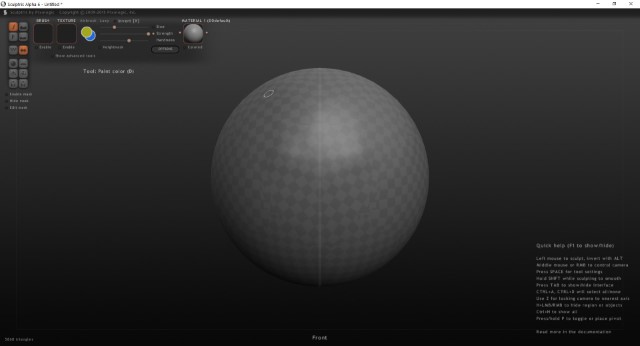
Sculptris is another free CAD Software that focuses on 3D Sculpting & 3D Modelling. It is made by one of the industry leaders named Pxiologic. The tool has a professional User Interface and that can be learned by anyone in a lesser time-period, given that you know the basics of creative designing. There are several features that would be a very helpful when it comes to designing; for instance, there is availability of both ZBrush navigation & standard-level navigation.
Scuplit 3D Modelling app

It also offer support for several plug-ins, using which you can extend features and productivity of it. In addition, there are some sculpting and designing-oriented features too, which you can find in official site. Sculptris is available for both Mac OS X and Windows with system requirement of 1 GB of RAM or more. Other noteworthy features of Sculptris are, GoZ button, using which you can transfer your mesh to ZBrush, Dynamic Tessellation, Immersive Interface, Projection Painting and many more.

Visit website

6. DraftSight 2019 Free CAD Software

DraftSight has always had the features and capabilities to be an optimal solution when you need to design in 2D, for personal or educational purposes. Now, DraftSight 2019 brings new and powerful features with robust 3D capabilities and more product choices and flexibility. With DWG as its primary drawing file format, it should be your choice when your intentions include editing of existing DWG files. Indeed, you can create new files in the native DWG format, at the same time. Another factor you would love about the tool is the availability of plenty of learning resources and an impressive level of support. Plus, you can find a large number of features in each section; let that be editing, productivity or exporting.
Draftsight

For instance, you will be able to save the project to a wide range of formats, including JPG, PNG, SVG, PDF etc. I also love that you have two UI options. You can either choose to work in the older classic UI or choose the newer ribbon-based workspace. The benefit of ribbons UI is that it lets you find, understand, and use commands with a minimum number of clicks. The ribbon design supersedes traditional menu bars and toolbars and provides a single user interface (UI) for all commands with labeled groupings and icons. I find it to be easier for beginners. DraftSight is available for Mac, Windows, Fedora and Ubuntu.

Visit website

7. FreeCAD

FreeCAD – open source parametric 3D CAD modeler, may not be an industry standard but the software will be truly useful if you are a CAD hobbyist with enough basics in CAD Modelling and related stuff. At the same time, an educator or programmer also will be able to get best out of FreeCAD, given the multi-purpose behavior and easier interface. Despite being a free tool, layout and designs of FreeCAD is almost on par with professional CAD software. It also packs in a ton of features. Probably the most important feature of FreeCAD is the Parametric Model — which lets you go back and edit your actions so that you get the best results while its modular architecture lets you get plug-ins for additional features you need.
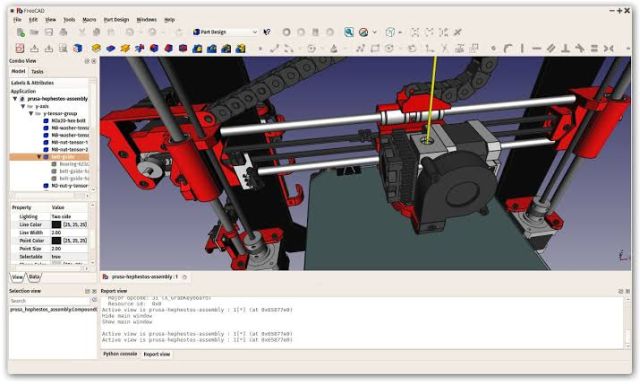
4. FreeCAD

In addition, from an advanced user’s perspective, its ability to be implemented into an app through Python module makes it quite useful. Additional features of FreeCAD include the Robot Simulation module that help you study movement of robots, Rendering module for exporting your project into external renderers, and a bunch of other modules that can be added as per your requirement. FreeCAD is available for Windows, Linux and Mac.

Visit website

8. OpenSCAD

If you will be okay with using a textual description language to create 3D CAD Objects, you may find OpenSCAD as an effective free CAD Software. There are several scenarios you might need such an interface, especially when you’re in a professional field. On those, you will have to be as specific as you can when you model things and you can find how useful OpenSCAD is in such cases. There is a extensive document that tells you about the parameters to be kept when you give descriptions through OpenSCAD. It offers an impressive level of documentation that would be helpful in the long run, for newbies.
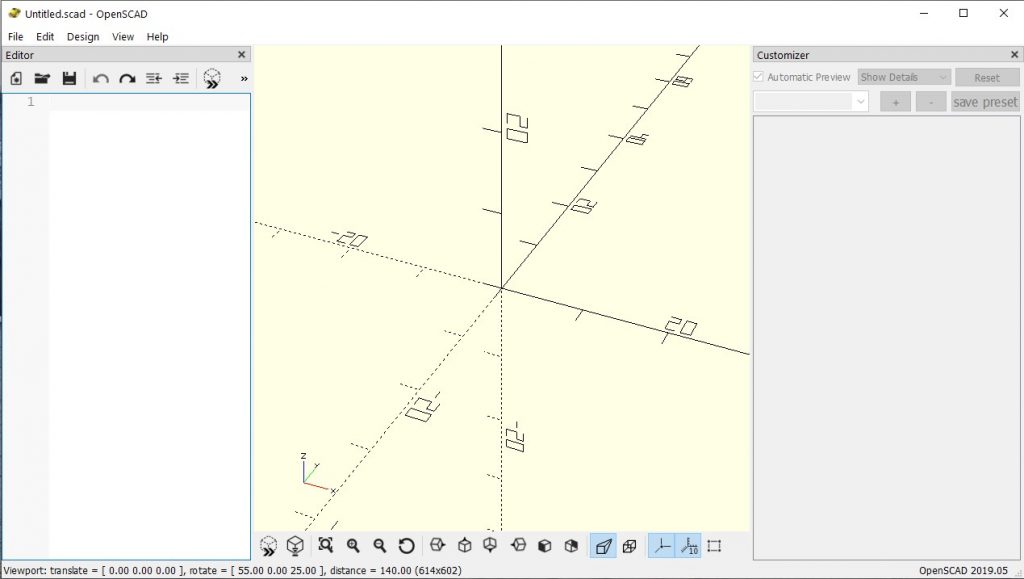
OpensCad

Also, the User Interface is completely a developer thing so you can go with OpenSCAD if you’re okay with it. OpenSCAD is available for Windows, Linux and Mac OS X. Developers say that they find it completely superb to use OpenSCAD for designing, as there are no kinds of menus or shortcuts, but pure code. However, that also means that it’s not meant for beginners. If you are just starting out with CAD, this is not the one for you.

Visit website

9. Tinkercad

Suppose you’re at your friend’s home and got a call to design a simple 3D Model; but your friend’s PC does not have any of the CAD software installed in it, though there’s a powerful internet connection. Then, you can definitely find a solution at Tinkercad, which is an online solution for 3D Digital Designs. The best thing about Tinkercad is that it does not require any kind of previous experience, but you can just go and start designing. Thus, we hope you understand why it does not have much professional-labelled features in it. It also comes from the Autodesk initiative we did talk about earlier and the tool is available cross platform, as you guessed.
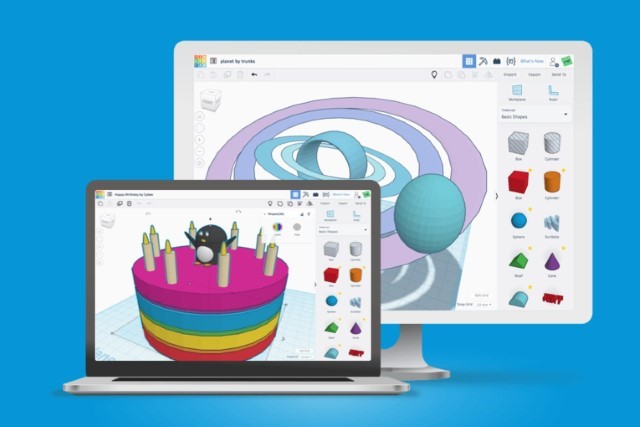
Tinkercad Free Cad Software

What I love about Tinkercad the most is that its meant to entice youngsters into learning CAD which might not seem like an interesting project to young audiences. The lectures are fun filled and there’s a lot to learn. You can learn 3D design, electronics design, code blocks, and more. There’s even tutorials on how to create Minecraft models.  There’s a gallery where you can find what other users are designing and sharing. Some features of Tinkercad are its integration with 3D Printing services, support for HTML5, and a powerful geometry kernel. This is a great place to start learning CAD and everyone should check it out.

Visit website

Free CAD Software Only for Students

10. AutoCAD

AutoCAD, the industry standard for years when it comes to 3D Modelling, offers a three-year free license if you are a student and want to design things. As you might know, AutoCAD comes from Autodesk and the actual price of the tool is so high that no student can afford it. However, the company also knows that if students are not able to use AutoCAD they won’t learn it. And that will hurt the real sales in future when those students become graduates and professionals.

9. AutoCADIn its student version, you get all the features of AutoCAD. When compared to $200-per-month plan of AutoCAD, this student version is indeed superb. So, when your college wants you to restrict to AutoCAD, you can go for this student plan. It is available for Mac OS X and Windows. Also, AutoCAD has a wide-enough range of documentation made available, using which you can get to know the basic & advanced features of the tool.

Visit website

Use These Free CAD Apps to Create Your Masterpiece

So there are the free CAD software that you can use to create your models. I have tried to include both easy to use and approachable cad software along with some pro tools that might need a bit of learning to use. Anyways, check them out and let us know your favorite CAD software in the comments below. Do mention any good CAD software which miss out on.

from Beebom https://beebom.com/free-cad-software/